... and the power of networking
I am an avid Tailscale user. I have a homelab running on my 12 year old PC with Proxmox, and I have several containers all hooked up together. It’s great. I can backup my photos, use my NAS, and run whatever linux container I want. And I can access them from all of my devices.
But if I want to share these services with my friends and family, I need them to download Tailscale and access the nodes that I share with them. Friction.
Worse yet, Tailscale isn’t on some devices like the Nintendo Switch or the Playstation. Friction.
I want to be able to play Minecraft with my friends while hosting on my homelab, but I don’t want to portforward 25565 and share my home network IP address like it’s 2011 anymore. Surely, if we have Tailscale magic we’re past that?
Nearly! With a bit of help from our friend iptables and a free vm from Oracle Cloud, we can do some networking magic to get my friends on my homelab minecraft server, and they don’t even know it!
Tailscale is incredibly powerful
I won’t write too much about Tailscale, but it’s some of the greatest networking softwares I’ve ever seen.
In short, it lets you connect any of your devices together in a peer-to-peer Wireguard, no ssh keys, single login way. It means I can connect any* device and have both SSH access and encrypted service access depending on what I’m hosting.
It’s allowed me to run a Proxmox host with several containers (Jellyfin, Immich, my NAS, etc.) and have them talk to my devices (my phone, my desktop, my laptop) magically.
It means I can access my services anywhere. And that’s awesome.
Tailscale is a walled garden by design
Tailscale is not supposed to replace all of your networking and hosting needs. It does a few jobs, and it does them well.
Tailscale has a few nifty features like serve and funnel.
Tailscale serve lets you expose your services to your tailnet
If you have a container on a device, Tailscale lets your provision https certificates for that tailnet url (https://<your-service>.<your-tailnet-id>.ts.net) and have it be accessible to your entire tailnet. This is nice when you don’t want to remember ports and want internal HTTPS (though this doesn’t really matter with Wireguard)
Tailscale funnel lets you expose your services to the internet*
If you have a container you’d like to, for some reason, expose to the broad Internet (some API, some low risk service), Tailscale lets you use the same serve infrastructure but with the funnel command.
This is great for testing and generally allowing internet access to your container. It’s relatively safe since the traffic is proxied through a Tailscale proxy node (read up on Tailscale Funnel and how it works here)
Here’s an image from Tailscale themselves: 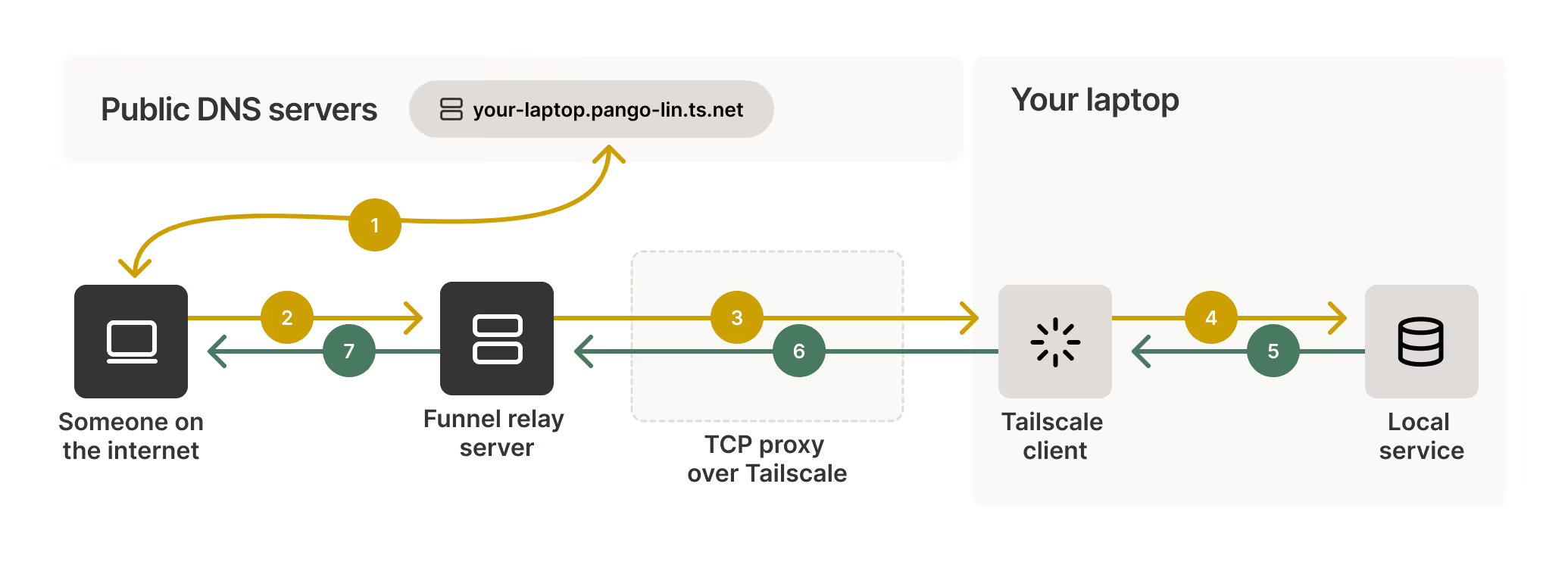
The magic here is that there is a TCP (note this!) proxy that allows your Tailnet service to expose its Tailscale IP only to the Funnel relay serve (not owned by me). In essence, to someone on the internet, they only know the domain name of your container as https://<your-service>.<your-tailnet-id>.ts.net but the IP resolves to the funnel relay server.
Perfect! Let’s just use this right?
Nope.
Tailscale Funnel, as mentioned earlier, is a TCP Proxy, but Minecraft Bedrock Server uses UDP. Rough.
But wait a minute, this architecture is very elegant. What if we have a public server of our own that we connect to our Tailnet (instant access to our container), and then do the exact same thing as Funnel but use a UDP proxy instead?
Spinning up a UDP Proxy
Enter Oracle Cloud Free VM.
Oracle Cloud gives you 2 AMD based compute VMs (1/8 OCPU and 1 GB memory each, plenty for our case) for life! This isn’t an ad (imagine I sell out to Oracle?), but it’s been a very seamless service to use and similar enough to AWS to get up and running.
Side note: they also give you an Arm compute instance with their Ampere A1 cores and 24GB memory that you can split between up to 4 VMs. You get quite a bit of compute for free here, and I did consider hosting the server directly on this instance, but provisioning one was a matter of luck because of high demand, and I wanted to host on my homelab for now.
Tailscale lets me connect this directly safely!
This was an incredible moment for me. I’m used to connecting devices I have access to to Tailscale. This time, though, I had a VM all the way in some San Jose data center, directly accessible to any of my tailnet just with an install and authentication.
I also utilized Grants/ACLs on Tailscale to make sure my relay server could only connect to my minecraft container on the UDP port .
{
"tagOwners": {
  // service containers like my NAS
	"tag:service":   ["autogroup:admin"],
	// Minecraft server container
	"tag:minecraft": ["autogroup:admin"],
	// Relay server VM
	"tag:relay":     ["autogroup:admin"],
},
"grants": [
	// allow myself to access everything
	{
		"src": ["autogroup:owner"],
		"dst": ["*"],
		"ip":  ["*"],
	},
	// allow services to talk to each other and each other only
	// also added minecraft server for backup reasons
	{
		"src": ["tag:service"],
		"dst": ["tag:service", "tag:minecraft"],
		"ip":  ["*"],
	},
	// minecraft relay only needs access via udp for packet forwarding
	{
		"src": ["tag:relay"],
		"dst": ["tag:minecraft"],
		"ip":  ["udp:19132"],
	},
	// minecraft server can talk to other services
	{
		"src": ["tag:minecraft"],
		"dst": ["tag:service"],
		"ip":  ["*"],
	},
	],
}
The comments in the ACL should describe how each of the containers are allowed to talk to each other.
Okay, now that we have everything on Tailscale set, we need to do the actual packet forwarding.
The magic of iptables
This part was really cool to me. I figured with UDP packet forwarding I’d need to spin up some sort of server that takes requests from my Minecraft clients and then does some function calling to send requests to the actual server.
Apparently, hidden as a very regular command line utility in Linux, iptables lets me do all of that with absolutely no ‘service’ running.
I was able to use Claude to help me with this after some thinking, but the idea is pretty simple.
# Enable IP forwarding
echo 'net.ipv4.ip_forward = 1' | sudo tee -a /etc/sysctl.conf
sudo sysctl -p

# Forward UDP 19132 to your Minecraft container's Tailscale IP
sudo iptables -t nat -A PREROUTING -p udp --dport 19132 -j DNAT \
  --to-destination <minecraft-tailscale-ip>:19132
sudo iptables -t nat -A POSTROUTING -j MASQUERADE

# Allow forwarded packets (Oracle blocks these by default)
sudo iptables -I FORWARD -p udp --dport 19132 -j ACCEPT

# Allow the relay port inbound
sudo iptables -I INPUT -p udp --dport 19132 -j ACCEPT

# Persist rules across reboots
sudo apt install iptables-persistent -y
sudo netfilter-persistent save
This allows the VM to accept UDP packets on 19132 and then forward them directly to the minecraft server (which is connected via Tailscale!) on 19132. We apply MASQUERADE so that the Minecraft container sends packets back to our relay, and our relay forwards packets back to the Minecraft client.
In essence, the clients think the relay itself is hosting the server (they only receive and send packets to the Oracle IP), and the container thinks the relay is a bunch of clients (it only receives and sends packets to the Oracle IP).
We only allow forwarding on 19132, and our ACL only allows communication over 19132. So everything is hermetically sealed.
This is awesome.
VPS/Relay Server
You can technically use any other computer to do this; there isn’t anything special about the Oracle VM. One thing is the Oracle VM is free, and also it’s highly available.
If you end up using any VPS or even your own public facing server, you just need to make sure you’re allowing traffic on the UDP port 19132.
For Oracle, this involves creating a subnet, adding an Ingress rule for all connections on UDP 19132, and then adding the VM to that public subnet.
This is similar on AWS and other VPS services.
Cloudflare
I also added an A record on Cloudflare to point to the Oracle VM public IP. I disabled proxying since this is raw UDP packet forwarding.
This is perfect too because your Tailscale IP is quite literally never revealed anywhere. In terms of Tailscale security, it doesn’t really matter if your IP is revealed to the public since your nodes are by default sealed from the public, but it’s nice to know that even at the public DNS record level, you’re only exposing an A record to an already public IP (Oracle VM)
And now my server (read: relay) has a friendly domain name!
The Minecraft server itself
I’m running this as an LXC container on my Proxmox host. This is the bedrock server so that I can play with my friends cross platform.
It’s a simple binary you can download here.
I set up a simple systemd service with tmux so that I can access the console anytime via SSH.
[Unit]
Description=Minecraft Bedrock Server
After=network.target

[Service]
Type=forking
User=root
WorkingDirectory=/opt/minecraft
ExecStart=/usr/bin/tmux new-session -d -s minecraft 'LD_LIBRARY_PATH=/opt/minecraft /opt/minecraft/bedrock_server'
ExecStop=/usr/bin/tmux send-keys -t minecraft 'stop' Enter
RemainAfterExit=yes
Restart=on-failure

[Install]
WantedBy=multi-user.target
You can also enable the Allowlist in server properties to make sure only those you want on the server can join. This is pretty trivial to do in the server properties file, and you can add players in the game console accessible through tmux with allowlist add <username>
Performance
You might be asking yourself, surely your latency is awful?
Unsurprisingly, no, not really! My home server is in Los Angeles and the relay server is in San Jose.
To my friends, they’re really just connecting ~20ms to San Jose + round trip to my homelab of ~20ms which means latency is well below rubberbanding territory.
When my friend and I recently played, since we’re both in LA, we have no issues playing together. Chunks take a second to load, but that’s more of a homelab hardware thing than network conditions.
Networking is wild
This was a great afternoon project. From setting up an Oracle VM for free to writing ACL Grants on Tailscale to punching holes in firewalls, this process taught me a lot about very cool network architecture.
In the future if the homelab can’t run the server super well, I’ll try out the Arm instances that Oracle provides for free.
The final thing that’s been quite satisfying is that while I had a lot of fun building out this infrastructure and seeing it work, to my friends, this network magic isn’t even visible.
To them, they just put in an IP and et voilà, they’re connected to a server that I can also hop on.
What more could I ask for in my private secret Minecraft tunnel?